(renamed the "EIA232 Standard" in the early 1990's)
Copyright © 1993-2015 by CAMI Research Inc., Acton, Massachusetts
Contents
What is EIA232?
Likely Problems when Using an EIA232 Interface
Pin Assignments
Cable Wiring Examples (New!)
Signal Definitions
Signal Ground and Shield
Primary Communications Channel
Secondary Communications Channel
Modem Status and Control Signals
Transmitter and Receiver Timing Signals
Channel Test Signals
Electrical Standards
Common Signal Ground
Signal Characteristics
Signal Timing
Accepted Simplifications of the Standard
Pin Description Index
References to EIA Publications
Back to CableEye® Home Page
What is EIA232?
Next Topic | TOC
In the early 1960s, a standards committee, today known as the Electronic Industries Association, developed a common interface standard for data communications equipment. At that time, data communications was thought to mean digital data exchange between a centrally located mainframe computer and a remote computer terminal, or possibly between two terminals without a computer involved. These devices were linked by telephone voice lines, and consequently required a modem at each end for signal translation. While simple in concept, the many opportunities for data error that occur when transmitting data through an analog channel require a relatively complex design. It was thought that a standard was needed first to ensure reliable communication, and second to enable the interconnection of equipment produced by different manufacturers, thereby fostering the benefits of mass production and competition. From these ideas, the RS232 standard was born. It specified signal voltages, signal timing, signal function, a protocol for information exchange, and mechanical connectors.
Over the 40+ years since this standard was developed, the Electronic Industries Association published three modifications, the most recent being the EIA232F standard introduced in 1997. Besides changing the name from RS232 to EIA232, some signal lines were renamed and various new ones were defined, including a shield conductor.
Likely Problems when Using an EIA232 Interface
Next Topic | Previous Topic | TOC
During this 40-year-long, rapidly evolving period in electronics, manufacturers adopted simplified versions of this interface for applications that were impossible to envision in the 1960s. Today, virtually all contemporary serial interfaces are EIA232-like in their signal voltages, protocols, and connectors, whether or not a modem is involved. Because no single "simplified" standard was agreed upon, however, many slightly different protocols and cables were created that obligingly mate with any EIA232 connector, but are incompatible with each other. Most of the difficulties you will encounter in EIA232 interfacing include at least one of the following:
1 - The absence or misconnection of flow control (handshaking) signals, resulting in buffer overflow or communications lock-up.
2 - Incorrect communications function (DTE versus DCE) for the cable in use, resulting in the reversal of the Transmit and Receive data lines as well as one or more handshaking lines.
3 - Incorrect connector gender or pin configuration, preventing cable connectors from mating properly.
Fortunately, EIA232 driver circuitry is highly tolerant of misconnections, and will usually survive a drive signal being connected to ground, or two drive signals connected to each other. In any case, if the serial interface between two devices is not operating correctly, disconnect the cable joining this equipment until the problem is isolated.
Pin Assignments
Next Topic | Previous Topic | TOC
Go to DTE Pinout (looking into the computer's serial connector)
Go to DCE Pinout (looking into the modem's serial connector)
If the full EIA232 standard is implemented as defined, the equipment at the far end of the connection is named the DTE device (Data Terminal Equipment, usually a computer or terminal), has a male DB25 connector, and utilizes 22 of the 25 available pins for signals or ground. Equipment at the near end of the connection (the telephone line interface) is named the DCE device (Data Circuit-terminating Equipment, usually a modem), has a female DB25 connector, and utilizes the same 22 available pins for signals and ground. The cable linking DTE and DCE devices is a parallel straight-through cable with no cross-overs or self-connects in the connector hoods. If all devices exactly followed this standard, all cables would be identical, and there would be no chance that an incorrectly wired cable could be used. This drawing shows the orientation and connector types for DTE and DCE devices:
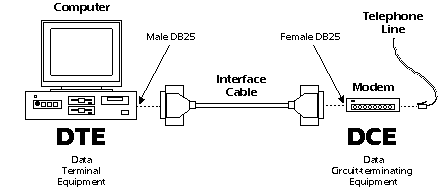
EIA232 communication function and connector types for a personal computer and modem. DCE devices are sometimes called "Data Communications Equipment" instead of Data Circuit-terminating Equipment.
Here is the full EIA232 signal definition for the DTE device (usually the PC). The most commonly used signals are shown in bold.
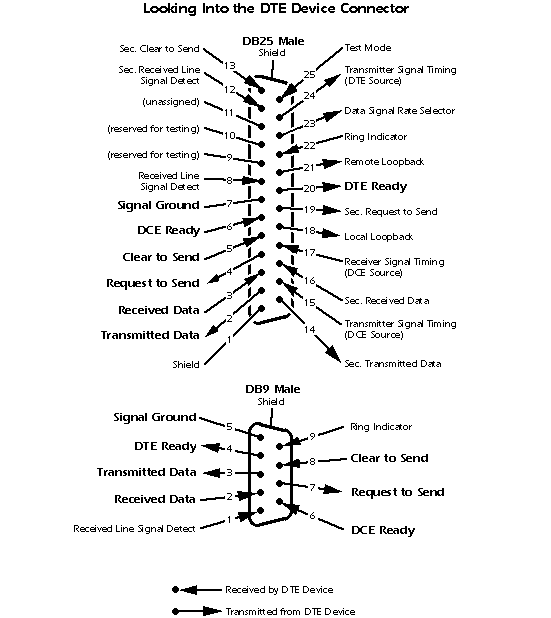
Copyright © 1993-2002 CAMI Research Inc.
Copyright © 1993-2002 CAMI Research Inc.
This shows the full EIA232 signal definition for the DCE device (usually the modem). The most commonly used signals are shown in bold.
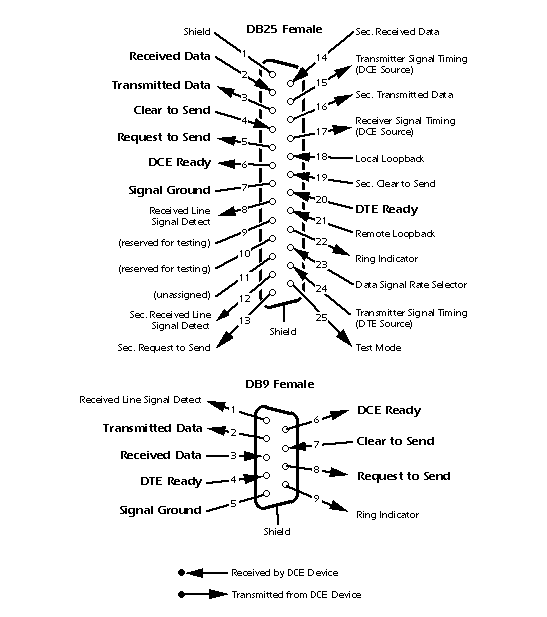
Copyright © 1993-2003 CAMI Research Inc.
Copyright © 1993-2003 CAMI Research Inc.
Many of the 22 signal lines in the EIA232 standard pertain to connections where the DCE device is a modem, and then are used only when the software protocol employs them. For any DCE device that is not a modem, or when two DTE devices are directly linked, far fewer signal lines are necessary.
You may have noticed in the pinout drawings that there is a secondary channel which includes a duplicate set of flow-control signals. This secondary channel provides for management of the remote modem, enabling baud rates to be changed on the fly, retransmission to be requested if a parity error is detected, and other control functions. This secondary channel, when used, is typically set to operate at a very low baud rate in comparison with the primary channel to ensure reliability in the control path. In addition, it may operate as either a simplex, half-duplex, or full-duplex channel, depending on the capabilities of the modem.
Transmitter and receiver timing signals (pins 15, 17, and 24) are used only for a synchronous transmission protocol. For the standard asynchronous 8-bit protocol, external timing signals are unnecessary.
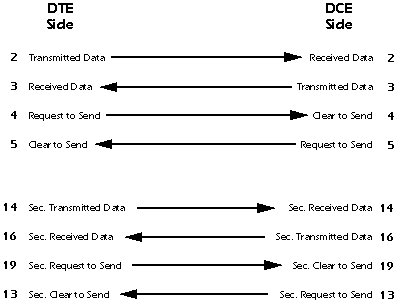
IMPORTANT: Signal names that imply a direction, such as Transmit Data and Receive Data, are named from the point of view of the DTE device. If the EIA232 standard were strictly followed, these signals would have the same name for the same pin number on the DCE side as well. Unfortunately, this is not done in practice by most engineers, probably because no one can keep straight which side is DTE and which is DCE. As a result, direction-sensitive signal names are changed at the DCE side to reflect their drive direction at DCE. The following list gives the conventional usage of signal names:
Cable Wiring Examples
Next Topic | Previous Topic | TOC
The following wiring diagrams come from actual cables scanned by the CableEye® PC-Based Cable Test System. CableEye software automatically draws schematics whenever it tests a cable. Click here to learn more about CableEye.
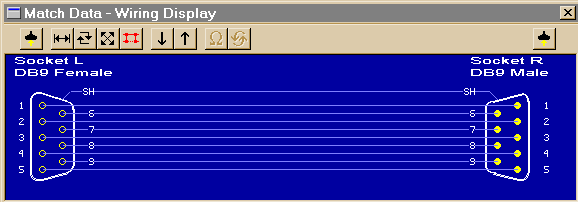
1 - DB9 All-Line Direct Extension
Next Cable | (no previous cable) || Next Topic
This shows a 9-pin DTE-to-DCE serial cable that would result if the EIA232 standard were strictly followed. All 9 pins plus shield are directly extended from DB9 Female to DB9 Male. There are no crossovers or self-connects present. Use this cable to connect modems, printers, or any device that uses a DB9 connector to a PC's serial port.
This cable may also serve as an extension cable to increase the distance between a computer and serial device. Caution: do not exceed 25 feet separation between devices without a signal booster!
80K
Left Side: Connect to DTE (computer) Right Side: Connect to DCE (modem or other serial device)
Cable image created by CableEye®
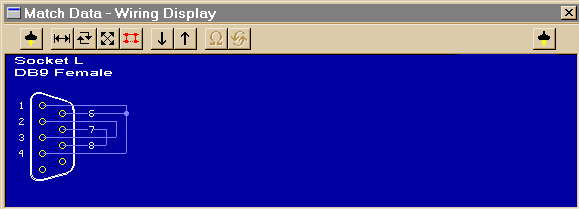
2 - DB9 Loopback Connector
Next Cable | Previous Cable || Next Topic
A loopback connector usually consists of a connector without a cable and includes internal wiring to reroute signals back to the sender. This DB9 female connector would attach to a DTE device such as a personal computer. When the computer receives data, it will not know whether the signals it receives come from a remote DCE device set to echo characters, or from a loopback connector. Use loopback connectors to confirm proper operation of the computer's serial port. Once confirmed, insert the serial cable you plan to use and attach the loopback to the end of the serial cable to verify the cable.
In this case, Transmit Data joins to Received Data, Request-to-Send joins to Clear-to-Send, and DTE-Ready joins to DCE-Ready and Received Line Signal Detect.
80K
Left Side: Connect to DTE (computer) Right Side: (none)
Cable image created by CableEye®
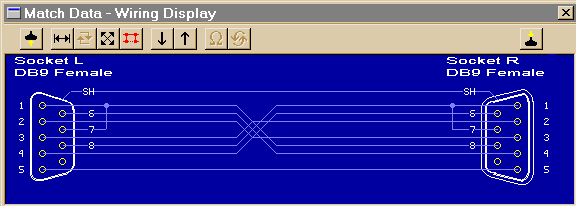
3 - DB9 Null Modem Cable
Next Cable | Previous Cable || Next Topic
Use this female-to-female cable in any application where you wish to connect two DTE devices (for example, two computers). A male-to-male equivalent of this cable would be used to connect two DCE devices.
The cable shown below is intended for RS232 asynchronous communications (most PC-based systems). If you are using synchronous communications, the null modem will have additional connections for timing signals, and a DB25 connector would be necessary.
NOTE: Not all null modem cables connect handshaking lines the same way. In this cable, Request-to-Send (RTS, pin 7) asserts the Carrier Detect (pin 1) on the same side and the Clear-to-Send (CTS, pin 8) on the other side of the cable.
This device may also be available in the form of an adapter.
80K
Left Side: Connect to 9-pin DTE (computer) Right Side: Connect to 9-pin DTE (computer)
Cable image created by CableEye®
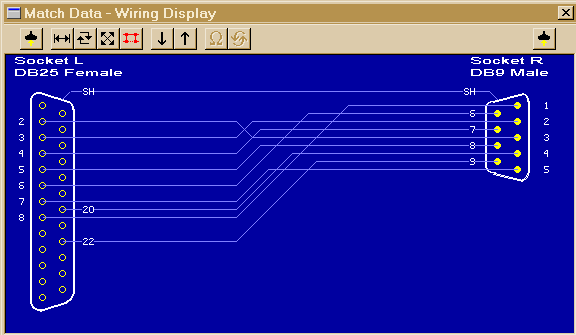
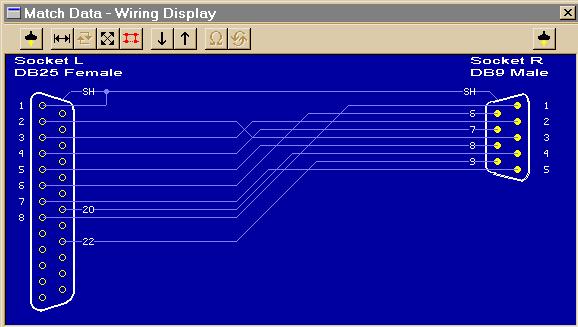
4 - DB25 to DB9 Adapter
Next Cable | Previous Cable || Next Topic
Signals on the DB25 DTE side are directly mapped to the DB9 assignments for a DTE device. Use this to adapt a 25-pin COM connector on the back of a computer to mate with a 9-pin serial DCE device, such as a 9-pin serial mouse or modem. This adapter may also be in the form of a cable.
80K
Left Side: Connect to 25-pin DTE (computer) Right Side: Connect to 9-pin DCE (modem)
Cable image created by CableEye®
5 - DB25 to DB9 Adapter (pin 1 connected to shield)
Next Cable | Previous Cable || Next Topic
This adapter has the same wiring as the previous cable (#4) except that pin 1 is wired to the connector shell (shield). Note that the cable's shield is usually a foil blanket surrounding all conductors running the length of the cable and joining the connector shells. Pin 1 of the EIA232 specification, called out as "shield", may be separate from the earth ground usually associated with the connector shells.
84K
Left Side: Connect to 25-pin DTE (computer) Right Side: Connect to 9-pin DCE (modem)
Cable image created by CableEye®
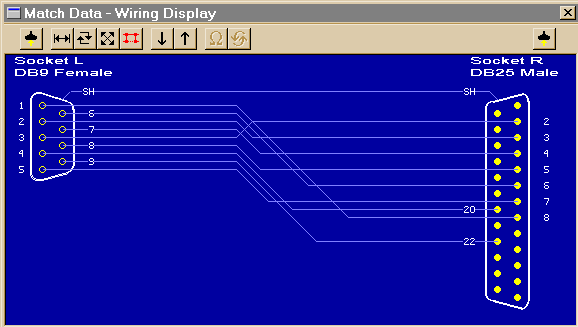
6 - DB9 to DB25 Adapter
Next Cable | Previous Cable || Next Topic
Signals on the DB9 DTE side are directly mapped to the DB25 assignments for a DTE device. Use this to adapt a 9-pin COM connector on the back of a computer to mate with a 25-pin serial DCE devices, such as a modem. This adapter may also be in the form of a cable.
80K
Left Side: Connect to 9-pin DTE (computer) Right Side: Connect to 25-pin DCE (modem)
Cable image created by CableEye®
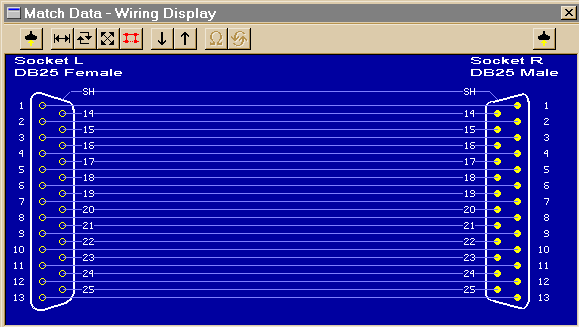
7 - DB25 All-Line Direct Extension
Next Cable | Previous Cable || Next Topic
This shows a 25-pin DTE-to-DCE serial cable that would result if the EIA232 standard were strictly followed. All 25 pins plus shield are directly extended from DB25 Female to DB25 Male. There are no crossovers or self-connects present. Use this cable to connect modems, printers, or any serial device that uses a DB25 connector to a PC's serial port.
This cable may also serve as an extension cable to increase the distance between computer and serial device. Caution: do not exceed 25 feet separation between devices without a signal booster!
Caution: the male end of this cable (right) also fits a PC's parallel printer port. You may use this cable to extend the length of a printer cable, but DO NOT attach a serial device to the computer's parallel port. Doing so may cause damage to both devices.
84K
Left Side: Connect to 25-pin DTE (computer) Right Side: Connect to 25-pin DCE (modem)
Cable image created by CableEye®
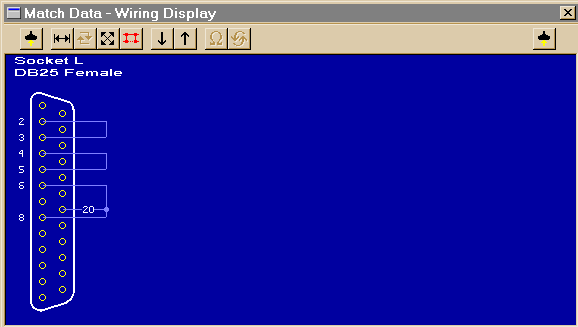
8 - DB25 Loopback Connector
Next Cable | Previous Cable || Next Topic
A loopback connector usually consists of a connector without a cable and includes internal wiring to reroute signals back to the sender. This DB25 female connector would attach to a DTE device such as a personal computer. When the computer receives data, it will not know whether the signals it receives come from a remote DCE device set to echo characters, or from a loopback connector. Use loopback connectors to confirm proper operation of the computer's serial port. Once confirmed, insert the serial cable you plan to use and attach the loopback to the end of the serial cable the verify the cable.
In this case, Transmit Data joins to Received Data, Request-to-Send joins to Clear-to-Send, and DTE-Ready joins to DCE-Ready and Received Line Signal Detect.
80K
Left Side: Connect to 25-pin DTE (computer) Right Side: (none)
Cable image created by CableEye®
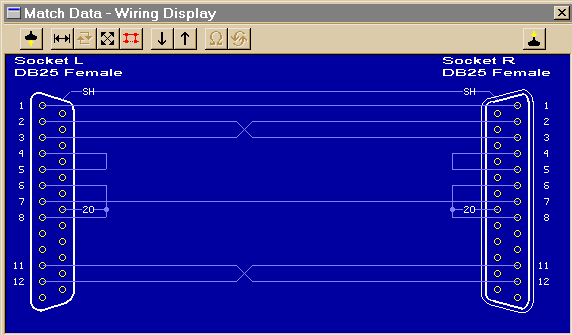
9 - DB25 Null Modem (no handshaking)
Next Cable | Previous Cable || Next Topic
Use this female-to-female cable in any application where you wish to connect two DTE devices (for example, two computers). A male-to-male equivalent of this cable would be used to connect two DCE devices.
Note that Pins 11 and 12 are not necessary for this null modem cable to work. As is often the case, the manufacturer of equipment that uses this cable had a proprietary application in mind. We show it here to emphasize that custom serial cables may include connections for which no purpose is clear.
IMPORTANT: This cable employs NO handshaking lines between devices. The handshake signals on each side are artificially made to appear asserted by the use of self-connects on each side of the cable (for example, between pins 4 and 5). Without hardware handshaking, you risk buffer overflow at one or both ends of the transmission unless STX and ETX commands are inserted in the dataflow by software.
84K
Left Side: Connect to 25-pin DTE (computer) Right Side: Connect to 25-pin DTE (computer)
Cable image created by CableEye®
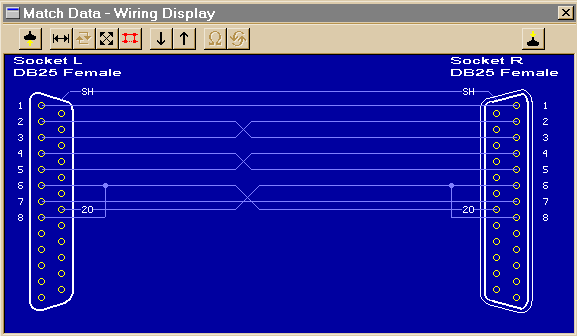
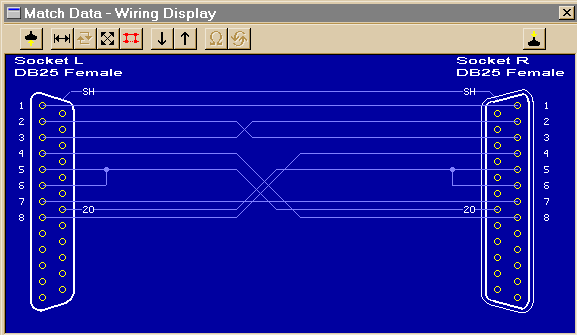
10 - DB25 Null Modem (standard handshaking)
Next Cable | Previous Cable || Next Topic
Use this female-to-female cable in any application where you wish to connect two DTE devices (for example, two computers). A male-to-male equivalent of this cable would be used to connect two DCE devices.
The cable shown below is intended for EIA232 asynchronous communications (most PC-based systems). If you are using synchronous communications, the null modem will have additional connections for timing signals not shown here.
NOTE: Not all null modem cables connect handshaking lines the same way. Refer to the manual for your equipment if you experience problems. In this cable, the DTE Ready (pin 20) on one side asserts the DCE Ready (pin 6) and the Request to Send (pin 5) on the other side.
84K
Left Side: Connect to 25-pin DTE (computer) Right Side: Connect to 25-pin DTE (computer)
Cable image created by CableEye®
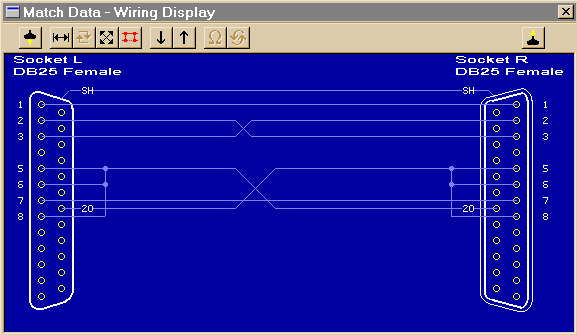
11 - DB25 Null Modem (unusual handshaking)
Next Cable | Previous Cable || Next Topic
Use this female-to-female cable in any application where you wish to connect two DTE devices (for example, two computers). A male-to-male equivalent of this cable would be used to connect two DCE devices.
NOTE: Not all null modem cables connect handshaking lines the same way. Refer to the manual for your equipment if you experience problems. In this cable, the DTE Ready (pin 20) on one side asserts the Clear to Send (pin 5), DCE Ready (pin 6), and Carrier Detect (pin 8) on the other side.
84K
Left Side: Connect to 25-pin DTE (computer) Right Side: Connect to 25-pin DTE (computer)
Cable image created by CableEye®
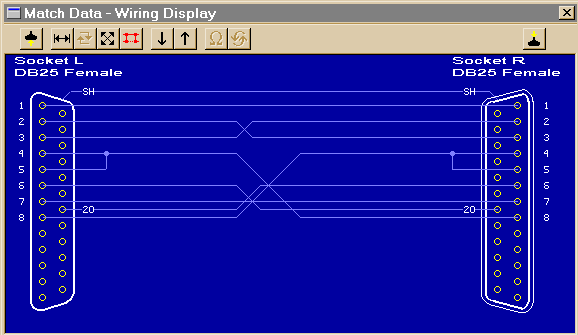
12 - DB25 Null Modem (unusual handshaking)
Next Cable | Previous Cable || Next Topic
Use this female-to-female cable in any application where you wish to connect two DTE devices (for example, two computers). A male-to-male equivalent of this cable would be used to connect two DCE devices.
NOTE: Not all null modem cables connect handshaking lines the same way. Refer to the manual for your equipment if you experience problems. In this cable, the Request-to-Send (pin 4) on one side asserts the Clear-to-Send (pin 5) on the SAME side (self-connect) and the Carrier Detect (pin 8) on the other side. The other handshaking signals are employed in a conventional manner.
84K
Left Side: Connect to 25-pin DTE (computer) Right Side: Connect to 25-pin DTE (computer)
Cable image created by CableEye®
13 - DB25 Null Modem (unusual handshaking)
Next Cable | Previous Cable || Next Topic
Use this female-to-female cable in any application where you wish to connect two DTE devices (for example, two computers). A male-to-male equivalent of this cable would be used to connect two DCE devices.
NOTE: Not all null modem cables connect handshaking lines the same way. Refer to the manual for your equipment if you experience problems. In this cable, the DTE Ready (pin 20) on one side asserts the Clear-to-Send (pin 5) and the DCE Ready (pin 6) on the other side. Request-to-Send (pin 4) on one side asserts Received Line Signal Detect (pin 8) on the other side.
84K
Left Side: Connect to 25-pin DTE (computer) Right Side: Connect to 25-pin DTE (computer)
Cable image created by CableEye®
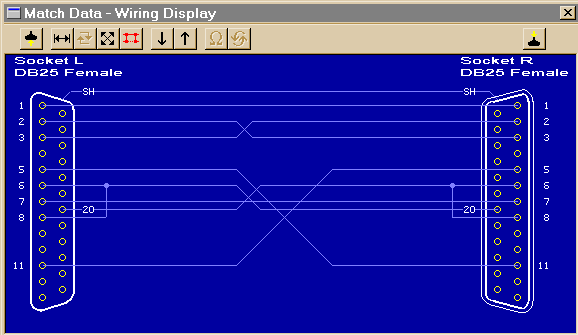
14 - DB25 Null Modem (unusual handshaking)
Next Cable | Previous Cable || Next Topic
Use this female-to-female cable in any application where you wish to connect two DTE devices (for example, two computers). A male-to-male equivalent of this cable would be used to connect two DCE devices.
NOTE: Not all null modem cables connect handshaking lines the same way. Refer to the manual for your equipment if you experience problems. In this cable, the DTE Ready (pin 20) on one side asserts the DCE Ready (pin 6), and Carrier Detect (pin 8) on the other side. Request to Send (pin 4) is unused, and Clear-to-Send (pin 5) is driven by a proprietary signal (pin 11) determined by the designer of this cable.
84K
Left Side: Connect to 25-pin DTE (computer) Right Side: Connect to 25-pin DTE (computer)
Cable image created by CableEye®
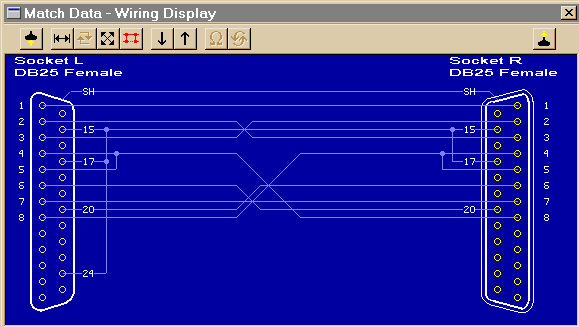
15 - DB25 Null Modem Cable (synchronous communications)
Next Cable | Previous Cable || Next Topic
This female-to-female cable is intended for synchronous EIA232 connections, and is designed to connect two DTE devices. It contains the standard connections of an asynchronous null modem cable, plus additional connections on pins 15, 17, and 24 for synchronous timing signals. To connect two DCE devices, use a male-to-male equivalent of this cable.
For synchronous communications, the null modem cable includes an additional conductor for timing signals, and joins pins 15, 17, and 24 on one side to pins 15 and 17 on the other. Pin 24 on the right side should connect to the timing signal source.
84K
Left Side: Connect to 25-pin DTE (computer) Right Side: Connect to 25-pin DTE (computer)
Cable image created by CableEye®
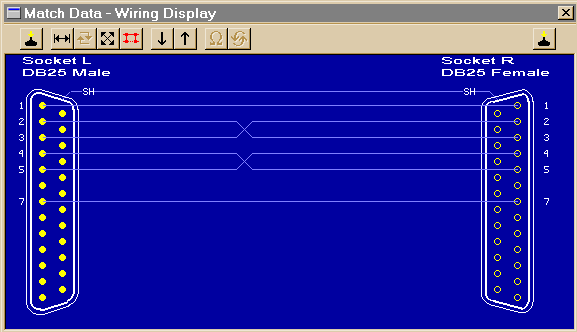
16 - DB25 Null Modem Cable (unconventional, may pose risk)
(no more) | Previous Cable || Next Topic
This simplified null modem cable uses only Request-to-Send (pin 4) and Clear-to-Send (pin 5) as handshaking lines; DTE Ready, DCE Ready, and Carrier Detect are not employed, so this cable should not be used with modems.
CAUTION! Normally, null modem cables have the same gender on each connector (either both male for two DTE devices, or both female for two DCE devices). This cable would be used when the gender on one of the devices does not conform to the standard. However, the opposite genders imply usage as a straight through cable, and if used in that manner will not function. Further, if used as a standard null-modem between two computers, the opposite gender allows you to connect one end to the parallel port, an impermissible situation that may cause hardware damage.
80K
Left Side: Connect to 25-pin DTE (computer) with Gender Changer Right Side: Connect to 25-pin DTE (computer)
Cable image created by CableEye®

Signal Definitions
Next Topic | Previous Topic | TOC
Signal functions in the EIA232 standard can be subdivided into six categories. These categories are summarized below, after which each signal described.
1 - Signal ground and shield.
2 - Primary communications channel. This is used for data interchange, and includes flow control signals.
3 - Secondary communications channel. When implemented, this is used for control of the remote modem, requests for retransmission when errors occur, and governance over the setup of the primary channel.
4 - Modem status and control signals. These signals indicate modem status and provide intermediate checkpoints as the telephone voice channel is established.
5 - Transmitter and receiver timing signals. If a synchronous protocol is used, these signals provide timing information for the transmitter and receiver, which may operate at different baud rates.
6 - Channel test signals. Before data is exchanged, the channel may be tested for its integrity, and the baud rate automatically adjusted to the maximum rate that the channel can support.
Signal Ground and Shield
Next Topic | Previous Topic | TOC
Pin 7, Pin 1, and the shell are included in this category. Cables provide separate paths for each, but internal wiring often connects pin 1 and the cable shell/shield to signal ground on pin 7.
Pin 7 - Ground All signals are referenced to a common ground, as defined by the voltage on pin 7. This conductor may or may not be connected to protective ground inside the DCE device. The existence of a defined ground potential within the cable makes the EIA232 standard different from a balanced differential voltage standard, such as EIA530, which provides far greater noise immunity.
Primary Communications Channel
Next Topic | Previous Topic | TOC
Pin 2 - Transmitted Data (TxD) This signal is active when data is transmitted from the DTE device to the DCE device. When no data is transmitted, the signal is held in the mark condition (logic '1', negative voltage).
NOTE: Pin 2 on the DCE device is commonly labeled "Received Data", although by the EIA232 standard it should still be called Transmitted Data because the data is thought to be destined for a remote DTE device.
Pin 3 - Received Data (RxD) This signal is active when the DTE device receives data from the DCE device. When no data is transmitted, the signal is held in the mark condition (logic '1', negative voltage).
NOTE: Pin 3 on the DCE device is commonly labeled "Transmitted Data", although by the EIA232 standard it should still be called Received Data because the data is thought to arrive from a remote DTE device.
Pin 4 - Request to Send (RTS) This signal is asserted (logic '0', positive voltage) to prepare the DCE device for accepting transmitted data from the DTE device. Such preparation might include enabling the receive circuits, or setting up the channel direction in half-duplex applications. When the DCE is ready, it acknowledges by asserting Clear to Send.
NOTE: Pin 4 on the DCE device is commonly labeled "Clear to Send", although by the EIA232 standard it should still be called Request to Send because the request is thought to be destined for a remote DTE device.
Pin 5 - Clear to Send (CTS) This signal is asserted (logic '0', positive voltage) by the DCE device to inform the DTE device that transmission may begin. RTS and CTS are commonly used as handshaking signals to moderate the flow of data into the DCE device.
NOTE: Pin 5 on the DCE device is commonly labeled "Request to Send", although by the EIA232 standard it should still be called Clear to Send because the signal is thought to originate from a remote DTE device.
Secondary Communications Channel
Next Topic | Previous Topic | TOC
Pin 14 - Secondary Transmitted Data (STxD)
Pin 16 - Secondary Received Data (SRxD)
Pin 19 - Secondary Request to Send (SRTS)
Pin 13 - Secondary Clear to Send (SCTS)
These signals are equivalent to the corresponding signals in the primary communications channel. The baud rate, however, is typically much slower in the secondary channel for increased reliability.
Modem Status and Control Signals
Next Topic | Previous Topic | TOC
Pin 6 - DCE Ready (DSR) When originating from a modem, this signal is asserted (logic '0', positive voltage) when the following three conditions are all satisfied:
1 - The modem is connected to an active telephone line that is "off-hook";
2 - The modem is in data mode, not voice or dialing mode; and
3 - The modem has completed dialing or call setup functions and is generating an answer tone.
If the line goes "off-hook", a fault condition is detected, or a voice connection is established, the DCE Ready signal is deasserted (logic '1', negative voltage).
IMPORTANT: If DCE Ready originates from a device other than a modem, it may be asserted to indicate that the device is turned on and ready to function, or it may not be used at all. If unused, DCE Ready should be permanently asserted (logic '0', positive voltage) within the DCE device or by use of a self-connect jumper in the cable. Alternatively, the DTE device may be programmed to ignore this signal.
Pin 20 - DTE Ready (DTR) This signal is asserted (logic '0', positive voltage) by the DTE device when it wishes to open a communications channel. If the DCE device is a modem, the assertion of DTE Ready prepares the modem to be connected to the telephone circuit, and, once connected, maintains the connection. When DTE Ready is deasserted (logic '1', negative voltage), the modem is switched to "on-hook" to terminate the connection.
IMPORTANT: If the DCE device is not a modem, it may require DTE Ready to be asserted before the device can be used, or it may ignore DTE Ready altogether. If the DCE device (for example, a printer) is not responding, confirm that DTE Ready is asserted before you search for other explanations.
Pin 8 - Received Line Signal Detector (CD) (also called carrier detect) This signal is relevant when the DCE device is a modem. It is asserted (logic '0', positive voltage) by the modem when the telephone line is "off-hook", a connection has been established, and an answer tone is being received from the remote modem. The signal is deasserted when no answer tone is being received, or when the answer tone is of inadequate quality to meet the local modem's requirements (perhaps due to a noisy channel).
Pin 12 - Secondary Received Line Signal Detector (SCD) This signal is equivalent to the Received Line Signal Detector (pin 8), but refers to the secondary channel.
Pin 22 - Ring Indicator (RI) This signal is relevant when the DCE device is a modem, and is asserted (logic '0', positive voltage) when a ringing signal is being received from the telephone line. The assertion time of this signal will approximately equal the duration of the ring signal, and it will be deasserted between rings or when no ringing is present.
Pin 23 - Data Signal Rate Selector This signal may originate either in the DTE or DCE devices (but not both), and is used to select one of two prearranged baud rates. The asserted condition (logic '0', positive voltage) selects the higher baud rate.
Transmitter and Receiver Timing Signals
Next Topic | Previous Topic | TOC
Pin 15 - Transmitter Signal Element Timing (TC) (also called Transmitter Clock) This signal is relevant only when the DCE device is a modem and is operating with a synchronous protocol. The modem generates this clock signal to control exactly the rate at which data is sent on Transmitted Data (pin 2) from the DTE device to the DCE device. The logic '1' to logic '0' (negative voltage to positive voltage) transition on this line causes a corresponding transition to the next data element on the Transmitted Data line. The modem generates this signal continuously, except when it is performing internal diagnostic functions.
Pin 17 - Receiver Signal Element Timing (RC) (also called Receiver Clock) This signal is similar to TC described above, except that it provides timing information for the DTE receiver.
Pin 24 - Transmitter Signal Element Timing (ETC) (also called External Transmitter Clock) Timing signals are provided by the DTE device for use by a modem. This signal is used only when TC and RC (pins 15 and 17) are not in use. The logic '1' to logic '0' transition (negative voltage to positive voltage) indicates the time-center of the data element. Timing signals will be provided whenever the DTE is turned on, regardless of other signal conditions.
Channel Test Signals
Next Topic | Previous Topic | TOC
Pin 18 - Local Loopback (LL) This signal is generated by the DTE device and is used to place the modem into a test state. When Local Loopback is asserted (logic '0', positive voltage), the modem redirects its modulated output signal, which is normally fed into the telephone line, back into its receive circuitry. This enables data generated by the DTE to be echoed back through the local modem to check the condition of the modem circuitry. The modem asserts its Test Mode signal on Pin 25 to acknowledge that it has been placed in local loopback condition.
Pin 21 - Remote Loopback (RL) This signal is generated by the DTE device and is used to place the remote modem into a test state. When Remote Loopback is asserted (logic '0', positive voltage), the remote modem redirects its received data back to its transmitted data input, thereby remodulating the received data and returning it to its source. When the DTE initiates such a test, transmitted data is passed through the local modem, the telephone line, the remote modem, and back, to exercise the channel and confirm its integrity. The remote modem signals the local modem to assert Test Mode on pin 25 when the remote loopback test is underway.
Pin 25 - Test Mode (TM) This signal is relevant only when the DCE device is a modem. When asserted (logic '0', positive voltage), it indicates that the modem is in a Local Loopback or Remote Loopback condition. Other internal self-test conditions may also cause Test Mode to be asserted, and depend on the modem and the network to which it is attached.
Electrical Standards
Next Topic | Previous Topic | TOC
The EIA232 standard uses negative, bipolar logic in which a negative voltage signal represents logic '1', and positive voltage represents logic '0'. This probably originated with the pre-RS232 current loop standard used in 1950s-vintage teletype machines in which a flowing current (and hence a low voltage) represents logic '1'. Be aware that the negative logic assignment of EIA232 is the reverse of that found in most modern digital circuit designs. See the inside rear cover of the CableEye manual for a comparison.
Common Signal Ground
Next Topic | Previous Topic | TOC
The EIA232 standard includes a common ground reference on Pin 7, and is frequently joined to Pin 1 and a circular shield that surrounds all 25 cable conductors. Data, timing, and control signal voltages are measured with respect to this common ground. EIA232 cannot be used in applications where the equipment on opposite ends of the connection must be electrically isolated.
NOTE: optical isolators may be used to achieve ground isolation, however, this option is not mentioned or included in the EIA232 specification.
Signal Characteristics
Next Topic | Previous Topic | TOC
Equivalent Circuit - All signal lines, regardless of whether they provide data, timing, or control information, may be represented by the electrical equivalent circuit shown here:
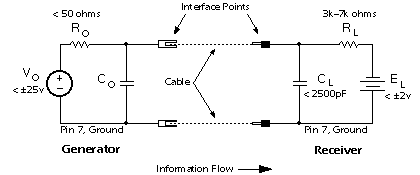
This is the equivalent circuit for an EIA232 signal line and applies to signals originating at either the DTE or DCE side of the connection. "Co" is not specified in the standard, but is assumed to be small and to consist of parasitic elements only. "Ro" and "Vo" are chosen so that the short-circuit current does not exceed 500ma. The cable length is not specified in the standard; acceptable operation is experienced with cables that are less than 25 feet in length.
Signal State Voltage Assignments - Voltages of -3v to -25v with respect to signal ground (pin 7) are considered logic '1' (the marking condition), whereas voltages of +3v to +25v are considered logic '0' (the spacing condition). The range of voltages between -3v and +3v is considered a transition region for which a signal state is not assigned.
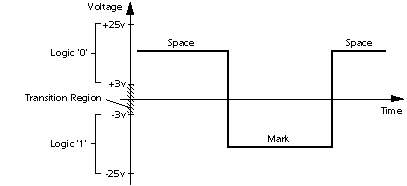
Logic states are assigned to the voltage ranges shown here. Note that this is a "negative logic" convention, which is the reverse of that used in most modern digital designs.
Most contemporary applications will show an open-circuit signal voltage of -8 to -14 volts for logic '1' (mark), and +8 to +14 volts for logic '0' (space). Voltage magnitudes will be slightly less when the generator and receiver are connected (when the DTE and DCE devices are connected with a cable).
IMPORTANT: If you insert an LED signal tester in an EIA232 circuit to view signal states, the signal voltage may drop in magnitude to very near the minimum values of -3v for logic '1', and +3v for logic '0'. Also note that some inexpensive EIA232 peripherals are powered directly from the signal lines to avoid using a power supply of their own. Although this usually works without problems, keep the cable short, and be aware that noise immunity will be reduced.
Short-Circuit Tolerance - The generator is designed to withstand an open-circuit (unconnected) condition, or short-circuit condition between its signal conductor and any other signal conductor, including ground, without sustaining damage to itself or causing damage to any associated circuitry. The receiver is also designed to accept any signal voltage within the range of ±25 volts without sustaining damage.
CAUTION: Inductive loads or magnetically induced voltages resulting from long cables may cause the received voltage to exceed the ±25-volt range momentarily during turn-on transients or other abnormal conditions, possibly causing damage to the generator, receiver, or both. Keep the cable length as short as possible, and avoid running the cable near high-current switching loads like electric motors or relays.
Fail-Safe Signals - Four signals are intended to be fail-safe in that during power-off or cable-disconnected conditions, they default to logic '1' (negative voltage). They are:
Request to Send - Default condition is deasserted.
Sec. Request to Send - Default condition is deasserted.
DTE Ready - Default condition is DTE not ready.
DCE Ready - Default condition is DCE not ready.
Note specifically that if the cable is connected but the power is off in the generator side, or if the cable is disconnected, there should be adequate bias voltage in the receiver to keep the signal above +3v (logic '0') to ensure that the fail-safe requirement is met.
Schmitt triggers or other hysteresis devices may be used to enhance noise immunity in some designs, but should never be adjusted to compromise the fail-safe requirement.
Signal Timing
Next Topic | Previous Topic | TOC
The EIA232 standard is applicable to data rates of up to 20,000 bits per second (the usual upper limit is 19,200 baud). Fixed baud rates are not set by the EIA232 standard. However, the commonly used values are 300, 1200, 2400, 9600, and 19,200 baud. Other accepted values that are not often used are 110 (mechanical teletype machines), 600, and 4800 baud.
Changes in signal state from logic '1' to logic '0' or vice versa must abide by several requirements, as follows:
1 - Signals that enter the transition region during a change of state must move through the transition region to the opposite signal state without reversing direction or reentering.
2 - For control signals, the transit time through the transition region should be less than 1ms.
3 - For Data and Timing signals, the transit time through the transition region should bea - less than 1ms for bit periods greater than 25ms,
b - 4% of the bit period for bit periods between 25ms and 125µs,
c - less than 5µs for bit periods less than 125µs.
The rise and fall times of data and timing signals ideally should be equal, but in any case vary by no more than a factor of three.An acceptable pulse (top) moves through the transition region quickly and without hesitation or reversal. Defective pulses (bottom) could cause data errors.
4 - The slope of the rising and falling edges of a transition should not exceed 30v/µS. Rates higher than this may induce crosstalk in adjacent conductors of a cable.
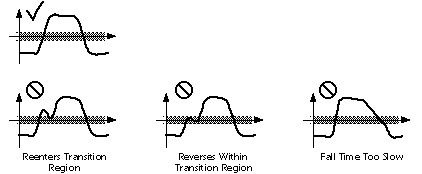
Note that neither the ASCII alphabet nor the asynchronous serial protocol that defines the start bit, number of data bits, parity bit, and stop bit, is part of the EIA232 specification. For your reference, it is discussed in the Data Communications Basics section of this web site.
Accepted Simplifications of the Standard
Previous Topic | TOC
The EIA232 document published by the Electronic Industries Association describes 14 permissible configurations of the original 22-signal standard. Each configuration uses a subset of the 22 defined signals, and serves a more limited communications requirement than that suggested by using all the available 22-signals. Applications for transmit-only, receive-only, half-duplex operation, and similar variations, are described. Unfortunately, connection to DCE devices other than modems is not considered. Because many current serial interface applications involve direct device-to-device connections, manufacturers do not have a standard reference when producing printers, plotters, print spoolers, or other common peripherals. Consequently, you must acquire the service manual for each peripheral device purchased to determine exactly which signals are utilized in its serial interface.
END
Return to TOC